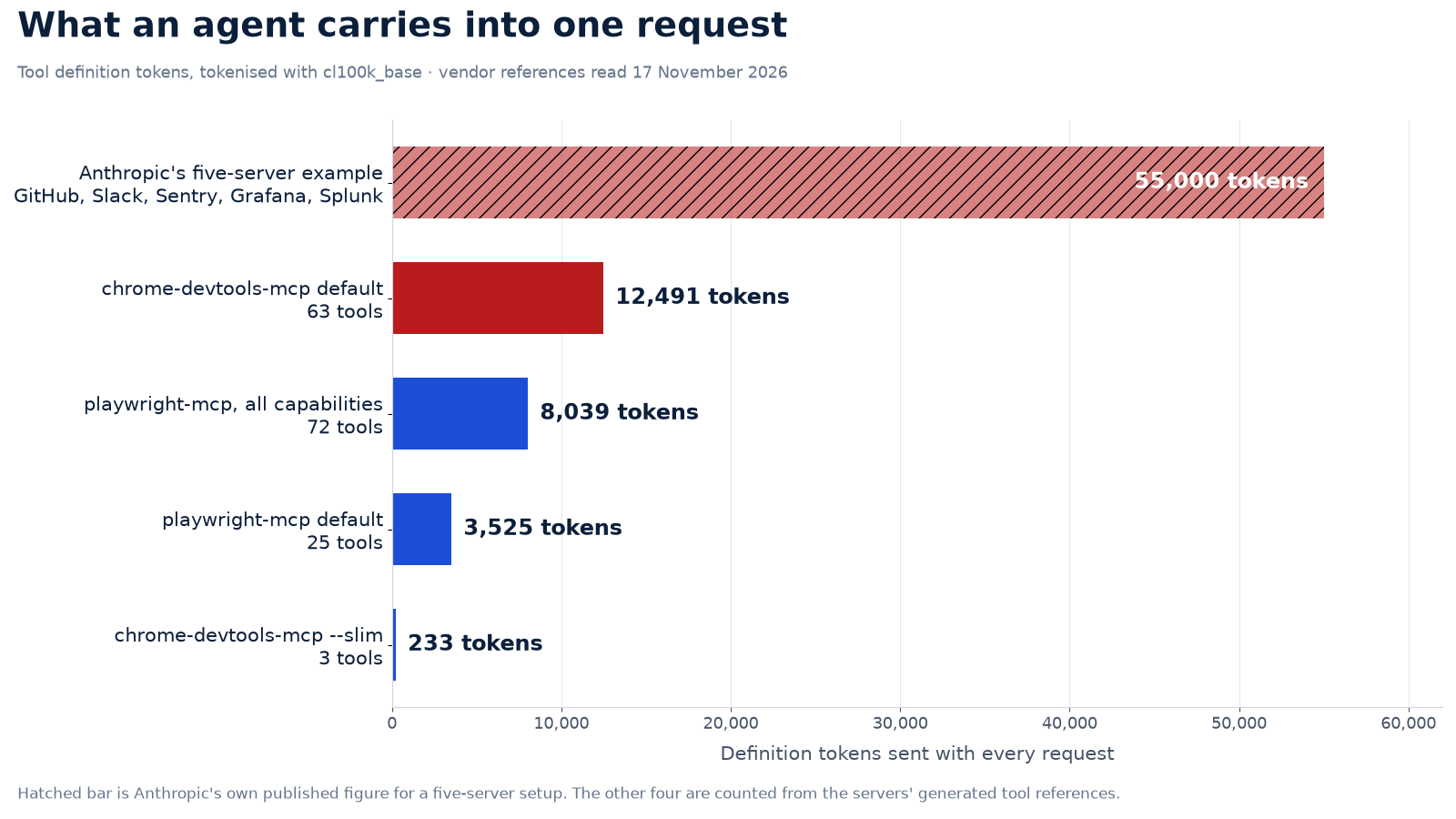
MCP tool definitions are billed and stored on every request. Anthropic’s own documentation puts a five-server setup at about 55,000 definition tokens before Claude does any work, and says tool-choice accuracy drops past 30 to 50 tools. Counted from the servers’ published references, chrome-devtools-mcp exposes 63 tools worth 12,491 tokens, while its –slim flag keeps 3 tools worth 233.
What your MCP servers spend before the first message
interactiveDefaults are measured, not guessed: chrome-devtools-mcp 1.13.0 exposes 63 tools whose published definitions total 12,491 tokens (198 per tool). Change the numbers to match your own servers.
Definitions per tool come from the vendors’ generated tool references, tokenised with cl100k_base as a proxy for the model’s own tokeniser. Treat the result as a model, not a bill: your system prompt, history and tool results sit on top of it.
The first time I counted tool definitions instead of guessing at them, the number was four times my estimate. That is the whole problem in one line: the tools your agent carries are invisible in the interface, absent from the invoice line that says input tokens, and charged anyway, request after request, before your model reads a single line of your code. What surprised me was not the total. It was the per-tool average, and how much of it came from descriptions nobody had read.
What Anthropic says about its own tool list
The vendors have started saying the quiet part out loud. Anthropic's platform documentation on the tool search tool contains a sentence that reads like a confession from the people who built the format:
A typical multiserver setup (GitHub, Slack, Sentry, Grafana, and Splunk) can consume ~55k tokens in definitions before Claude does any work. Tool search typically reduces this by over 85 percent, loading only the 3–5 tools Claude needs for a given request.
Anthropic, Tool search tool documentation, read 17 November 2026
The same page names the second cost, which no calculator shows. "Claude's ability to pick the right tool degrades once you exceed 30–50 available tools." That is not a token bill. It is a correctness bill, and it arrives as a retry, a wrong file edit, or a browser session that opens the wrong page.
The mechanism is stated plainly in the context window guide: "Everything in the request counts toward the context window: the system prompt, every message in messages (including tool results, images, and documents), and your tool definitions." Definitions are input tokens. They are billed as input tokens. Prompt caching changes the price of those tokens, not whether they sit in the window.
What 63 tools cost, counted rather than estimated
Anthropic's figure covers servers nobody can inspect from outside. Browser servers publish their tool lists, so they can be counted exactly. I took the generated tool reference that chrome-devtools-mcp 1.13.0 ships in its repository, serialised each tool's name, description and parameter list the way a client sends it, and tokenised the result with cl100k_base as a stand-in for the model's own tokeniser. Playwright MCP publishes the same thing in its README, generated by its own build script.
| Server and mode | Tools | Definition tokens | Per tool | How it was established |
|---|---|---|---|---|
| chrome-devtools-mcp 1.13.0, default | 63 | 12,491 | 198 | Counted from the vendor's generated tool reference |
| chrome-devtools-mcp 1.13.0, --slim | 3 | 233 | 78 | Counted from the vendor's slim reference |
| playwright-mcp, default | 25 | 3,525 | 141 | Counted from the README's generated tool section |
| playwright-mcp, every capability pack | 72 | 8,039 | 112 | Same README, opt-in sections included |
| Five-server stack (GitHub, Slack, Sentry, Grafana, Splunk) | not published | about 55,000 | — | Anthropic's stated figure, not counted here |

The spread inside one server is the part worth noticing. Chrome DevTools MCP averages 198 tokens per tool, Playwright 141, and the slim set 78. Description length drives it, not parameter count, which is why a two-tool family can outweigh a ten-tool family in the next table.
Where the 12,491 tokens sit
Not every tool costs the same, and not every tool earns its place in a coding session. Sorted by family, the distribution is lopsided in a way that suggests an afternoon of pruning would pay for itself.
| Tool family | Tools | Definition tokens |
|---|---|---|
| Memory (heap snapshots) | 14 | 2,745 |
| Debugging (console, scripts, CSS, logpoints) | 10 | 2,192 |
| Input automation (click, type, drag, upload) | 10 | 1,292 |
| Network mocks | 2 | 929 |
| Navigation | 6 | 769 |
| Emulation | 2 | 713 |
| Seven smaller families (performance, PWA, WebAuthn, network, third-party, extensions, WebMCP) | 19 | 2,851 |
| Total, tool entries | 63 | 11,431 |

Fourteen heap-snapshot tools cost 2,745 tokens, more than every navigation, emulation and performance tool combined. Two network-mock tools cost 929, which is 465 tokens each and 20 percent more than the entire six-tool navigation family. At 300 requests a day, dropping the heap family alone is an annual saving of about 592 USD, and the breakeven for the afternoon it takes is measured in weeks. Neither family is wrong to exist. They are wrong to ride along on the request where the agent is asked to fix a contrast ratio.
The bill arrives on every request, not once a day
Here the arithmetic becomes concrete. At 300 requests a day on Claude Sonnet 5.5, with input at 2 USD per million tokens, every 1,000 definition tokens costs about 18 USD a month. Ten thousand tokens cost 180. That unit rate makes the comparison easy to hold in your head.
| Definitions per request | Uncached, per month | Cached prefix, per month | After tool search, per month | Share of a 200k window |
|---|---|---|---|---|
| 233 (DevTools --slim) | $4.19 | $0.21 | $0.63 | 0.1% |
| 3,525 (Playwright default) | $63.45 | $3.17 | $9.52 | 1.8% |
| 12,491 (DevTools default) | $224.84 | $11.24 | $33.73 | 6.2% |
| 55,000 (Anthropic's five-server example) | $990.00 | $49.50 | $148.50 | 27.5% |
Caching is the lever most teams reach for first, and it works: the same definitions at 5 percent of the input rate turn 224.84 USD into 11.24 USD. The cost difference is real money, and it is also a trap, because caching does nothing about the window. A cached prefix still occupies its 12,491 tokens. When the agent fills that window with file reads and tool results, the definitions are the part it cannot evict.
The accuracy bill is larger than the token bill
Anthropic's 30-to-50 guidance is the number to keep. Chrome DevTools MCP ships 63 tools in its default mode, which is 1.3 times past the top of that range before a second server joins. Playwright's default lands at 25, inside the range, and its full capability set at 72, outside it.
A wrong tool choice is more expensive than a definition list. It burns a request, then a retry, then the conversation history that explains what went wrong. In agent work the failure compounds: the model re-reads the same files, re-runs the same command, and pays the definition list again on every attempt.
Where 63 tool definitions go, and the switch for each case
diagram
The switches the vendors already shipped
Both browser-server vendors noticed the same thing, and each shipped a different answer. Google added a slim mode to Chrome DevTools MCP. Microsoft's Playwright MCP README now argues that its own CLI is the better fit for coding agents, and states the reason in token terms: "CLI invocations are more token-efficient: they avoid loading large tool schemas and verbose accessibility trees into the model context."
The Chrome DevTools configuration reference describes its flag in one line: "--slim exposes a 'slim' set of 3 tools covering navigation, script execution and screenshots only. Useful for basic browser tasks." The same reference documents narrower knobs, including a screenshot size cap that notes image tokens scale with dimensions rather than encoded bytes.
Anthropic's answer sits on the API side. Mark tools with defer_loading: true, add a tool search tool to the request, and the definitions stay in your catalogue until Claude asks for them. The API returns up to five matching tools per search by default and expands them into full definitions at that point. Anthropic puts the reduction at over 85 percent, and the search tool is supported from Claude Sonnet 4.6 onward, including Sonnet 5.5, Opus 5.5 and Haiku 5.5, but not on Opus 4.1 and earlier.
Two switches that keep the definitions out
copy-readyBoth blocks are copied from vendor pages read on 17 November 2026: the --slim flag from Chrome DevTools MCP's configuration reference, and deferred loading from Anthropic's tool search documentation.
{
  "mcpServers": {
    "chrome-devtools": {
      "command": "npx",
      "args": [
        "-y",
        "chrome-devtools-mcp@latest",
        "--slim"
      ]
    }
  }
}
response = client.messages.create(
    model="claude-sonnet-5-5",
    max_tokens=2048,
    messages=[{"role": "user", "content": "What is the weather in Seoul?"}],
    tools=[
        {"type": "tool_search_tool_regex_20251119",
         "name": "tool_search_tool_regex"},
        {
            "name": "get_weather",
            "description": "Get the weather at a specific location",
            "input_schema": {
                "type": "object",
                "properties": {"location": {"type": "string"}},
                "required": ["location"],
            },
            "defer_loading": True,
        },
    ],
)
The tool search tool itself must stay non-deferred, and the API returns up to 5 matching tools per search by default. The slim set keeps navigate, evaluate and screenshot only, so move the rest to the CLI or to a second server before you switch it on.
The Honest Catch
To be honest, three limits sit under every number above. The token counts come from generated documentation, not from a captured request, so treat them as a faithful model rather than a meter reading; a client that trims descriptions will send less. The 55,000 figure is Anthropic's own example for a stack I cannot inspect, which is why it sits in its own row instead of being averaged with the counted ones. And the tokeniser is a proxy: cl100k_base is not Claude's tokeniser, so expect a few percent of drift either way.
The bigger caveat is capability. Slim mode removes the performance tracing, heap snapshots and Lighthouse tools that make Chrome DevTools MCP worth installing for a debugging session. A team that switches to three tools to save 12,258 tokens and then discovers it cannot record a trace has traded a real capability for a number. Judge the switch by the task the agent actually performs, not by the smallest possible count.
Audit your own setup in five steps
- List every MCP server your agent starts with, and the tool count each exposes. A server that starts with 63 tools is a decision someone made, and it can be unmade.
- Count the definitions once with the token-counting API or by tokenising the server's published reference. One measurement is enough to set a budget.
- Divide by your window. Above 10 percent, plan a change; above 25 percent, stop installing servers until you have made one.
- Match the lever to the tools. Browser work goes to
--slimor a CLI. A long tail goes behinddefer_loading. A stable, small set stays put and gets cached. - Re-measure after each change, and write the number beside the server list, so the next installation argues with a figure instead of a feeling.
For the wider money picture, the site's cost per AI session calculator takes the same token arithmetic across a working day, and the cache-write and context-cliff breakdown explains why a prefix that looks cheap on paper still bills when it is rewritten. If your agent is failing at finding files rather than counting tokens, the deterministic pipeline comparison covers the other half of the problem. For a full stack decision that folds subscriptions, seats and usage into one number, the TCO decision calculator runs the same figures end to end.
Who should skip the trim
If you run a one-person shop and your agent starts one server with eight tools, stop reading and go build. A 2,000-token definition list is 1 percent of a 200,000-token window and 18 USD a month at 300 requests a day; the engineering hour you would spend trimming it is worth more than the saving. The same holds if your window is a million tokens and your stack is small: 55,000 tokens is 5.5 percent of it, and the money case collapses into caching.
The stack to leave alone is the one that is small, stable and genuinely used. The stack to change is the one nobody chose: 63 tools installed because the default config said so, a second browser server added for one screenshot, a memory toolset that has never opened a heap snapshot.
The one-page audit sheet behind this piece is a free PDF further down this page: no email, no credit card required, and risk-free to ignore if your stack is already small.
FAQ
Are MCP tool definitions really billed as input tokens?
Yes. Anthropic counts the system prompt, every message and every tool definition as input, and states that each of them occupies the context window. A definition list of 12,491 tokens is charged on every request that carries it.
Does --slim break the Chrome DevTools MCP setup?
It removes tools, so the sessions that need them break. The slim set keeps navigate, evaluate and screenshot; performance traces, network inspection and heap snapshots are not in it. Keep a full-mode entry in a second client profile, or reach for the CLI when a debugging session needs the long list.
Is tool search available on the model I use?
Anthropic lists it from Claude Sonnet 4.6 and Claude Opus 4.5 onward, including Sonnet 5.5, Opus 5.5 and Haiku 5.5. Opus 4.1 and earlier do not support it. The regex variant takes regex patterns; the BM25 variant takes natural language, up to 500 characters.
Does 55,000 tokens overflow a million-token window?
No. It takes 5.5 percent of a million-token window and 27.5 percent of a 200,000-token one. The reason to care is not overflow, it is price and tool-choice accuracy: the definitions are paid again on every request, and Anthropic says accuracy drops past 30 to 50 tools.
What if I cannot change the server's tool list?
Change the client instead. Deferred loading is set on the tool entry in your request, so a thin proxy or your own tool loop can add it. If the client gives you no such control, split the servers per task: a browser server for browser work, a repository server for code, never both in the same request.
The short version
- Tool definitions are input tokens, billed on every request and held in the window.
- Anthropic's five-server example costs about 55,000 tokens before any work; counted, Chrome DevTools MCP's 63 tools cost 12,491.
- --slim keeps 3 tools and 233 tokens, a 98 percent cut that also removes the debugging tools.
- At 300 requests a day, 1,000 definition tokens cost about 18 USD a month on Sonnet 5.5; caching cuts it to 5 percent of that, and tool search to roughly 15 percent of the remainder.
- Past 30 to 50 tools, Anthropic says tool choice degrades, which costs more than the tokens.
Leave a Reply