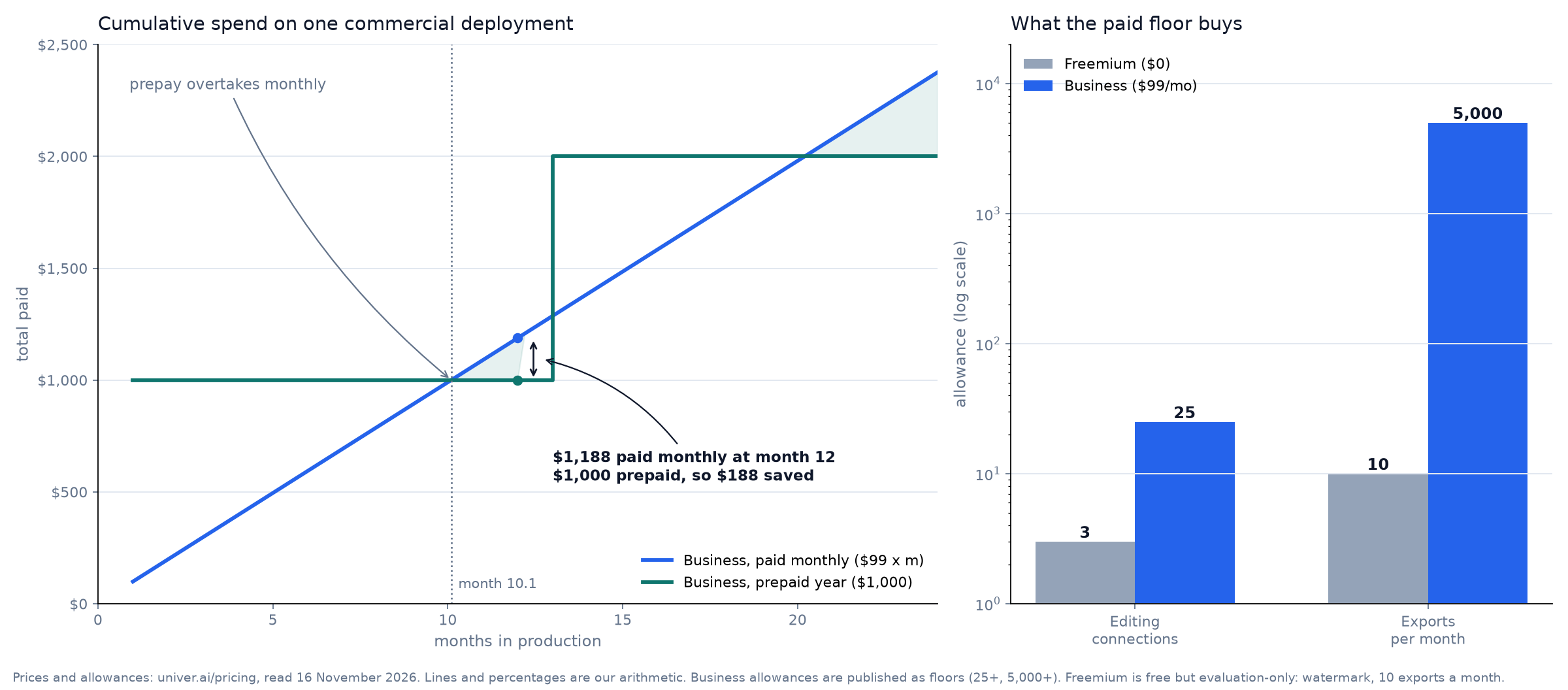
Short answer: Univer Office SDK pricing splits in two. The Apache-2.0 core is free and needs no license file; commercial production starts at $99 a month or $1,000 a year, because the free tier caps you at 3 editing connections and 10 exports a month, with watermarks on output.
Univer Business in 2026: your peak, and what a year costs
interactiveDrag your peak editors and monthly exports. The ceilings are the published Business ones: 25 editing connections and 5,000 exports a month.
Floors are Univer’s published Business allowances (25+ editing connections, 5,000+ exports a month). The arithmetic is mine, not a vendor quote. Freemium is an evaluation tier: 3 connections, 10 exports a month, watermarked output.
I read the pricing page, the license reference and the repository on 16 November 2026, then did the arithmetic nobody prints on a pricing table. What follows is the boundary between the free editor and the paid one, in the order a builder meets it.
The free core is not a demo. It is a working editor.
Start with what costs nothing. The repository carries 26,507 stars, dates from September 2022 and ships under Apache-2.0. That covers the Web SDK engine: content models, the plugin and dependency system, the command and undo stack, the formula engine, the rendering engine and the Facade API your application talks to. Sheets and Docs editing are in there too.
The quick start proves the point. Two packages, one container, a workbook appears. No license file, no server, no sales call.
This example uses open-source packages and needs no commercial Univer license or Server SDK.
dream-num/univer README, quick start, read 16 November 2026
There is a second free path that matters more to an API product: headless. The same content plugins run in Node.js with no UI rendering, so a backend job can open a workbook, change cells, recalculate and save without a browser in the loop. For a one-person tool that turns a CSV into a priced quote, that is the whole feature set, and the cost is zero.
| What you get without a key | Included in the Apache-2.0 core |
|---|---|
| Spreadsheet editing, formatting, freeze panes, merged cells | Yes |
| Document editing with lists, hyperlinks and rich text | Yes |
| Formulas, defined names, filtering, sorting, validation | Yes |
| Headless recalculation in Node.js | Yes |
| Snapshot save and restore as JSON | Yes |
| XLSX, DOCX and PPTX import or export | No, sold separately |
| Real-time collaboration and edit history | No, Server SDK |
| Charts beyond line, column and bar; pivot tables at scale; printing past page 3 | No, commercial plugins |
The wall is a file format and a watermark
Here is the part that decides budgets. Your own database can hold a Univer snapshot for free: workbook.save() returns JSON, and loading it back is another call. The moment a customer presses Export and expects an .xlsx, you have left the free path. File conversion is a separately distributed service, and the open repository is explicit that snapshot persistence is not the same thing as XLSX exchange.
Free output also carries watermarks, and free capacity is small. Three editing connections. Ten exports a month. One pivot table per workbook. Charts limited to line, column and bar. Printing stops at the third page in Sheets and the first page everywhere else.
Then the sentence that closes the door, from Univer's own FAQ.
Development and testing can use Freemium without an additional purchase. It provides access to commercial SDK capabilities with watermarks and some feature restrictions. Commercial production deployments require Business or Enterprise.
Univer Office SDK pricing FAQ, read 16 November 2026
Read that twice before you plan around a free tier. Freemium is an evaluation licence with commercial features switched on and a watermark applied. It is generous for a prototype. It is not a production licence, however well the editor runs.
| Freemium | Business | Enterprise | |
|---|---|---|---|
| Price | $0 | $99 a month, or from $1,000 a year billed annually | Custom quote |
| Editing connections | 3 | 25+ | Unlimited |
| Exports a month | 10 | 5,000+ | Unlimited |
| Watermark | On affected output | None | None |
| Sheets charts | Line, column, bar only | Full set | Full set |
| Pivot tables | One per workbook | Included | Included |
| Printing | 3 pages in Sheets, 1 page elsewhere | Jobs and pages not limited | Jobs and pages not limited |
| Collaboration | 1 node, 3 connections | Included, 25+ connections | Distributed deployment |
| File exchange | Not included | Included | Included |
| Domains | — | One main domain and all subdomains | Per agreement |
| Support | Community and docs | Standard; advanced support $1,000 a month | Advanced included |
| Term | — | 1 to 12 months, no automatic renewal | Per agreement |
$99 a month, $1,000 a year, and the 10.1-month line
The paid tier is simple arithmetic. Twelve months of monthly billing costs $1,188. The annual price is $1,000. The cost difference is $188, or 15.8%.
What most buyers get wrong is when that discount starts. Paying monthly is cheaper until you pass month 10.1, because $1,000 divided by $99 lands just after the tenth payment. A project that ends in the spring should stay monthly. A product you intend to keep through the winter should not.
That is the same shape as every prepay decision on this site, and the break-even month is the only number you need to compare two contracts of different lengths. The prepay break-even calculator runs the general case, and the seven-tier re-audit in annual versus monthly billing shows how far the line moves between vendors.
| Line item | Amount | How it is calculated |
|---|---|---|
| One year, paid monthly | $1,188 | $99 × 12 |
| One year, prepaid | $1,000 | Published annual price |
| Saved by prepaying | $188 | 15.8% of $1,188 |
| Month the prepay line crosses | 10.1 | $1,000 ÷ $99 |
| Per editing connection, prepaid | $3.33 a month | $1,000 ÷ 12 ÷ 25 |
| Per export, prepaid | $0.0167 | $1,000 ÷ 60,000 |
| Freemium export ceiling | 120 a year | 10 × 12 |
Two per-unit numbers are worth keeping. At the floor, a connection costs about $3.33 a month on the prepaid plan, and an exported file costs under two cents. If your product charges $20 for a document workflow, the licence is noise. If you charge $3 for a converted spreadsheet, it is your gross margin.
The same metering logic decides whether an allowance fits at all: plans that count executions instead of operations punish different teams, which is why the executions-versus-operations trap keeps catching automation buyers. Here the meters are connections and exports, so measure those two before you choose a term.
The two-minute lease behind the seat count
An editing connection is not a user account. It is a slot held by an instance that is actively submitting changes. The timer resets with every submission and releases two minutes after the last one, or when the page closes.
That single sentence changes your sizing. Forty people editing across a working day can share 25 slots, provided no more than 25 submit inside the same two-minute window. Your busiest quarter of an hour decides the tier, not your headcount and not last month's average.
Full capacity is survivable but ugly. Instances that already hold a connection keep editing and submitting. A browser that cannot get one keeps changes locally, retries for several minutes, then switches to offline editing and submits when the load drops. Nothing is lost, and nobody on the page knows they are editing against a stale copy.
Agents are licensed like colleagues
What surprised me in the pricing FAQ is the AI SDK. When an agent joins a collaborative session and submits an edit, it takes a connection exactly like a person. Opening a document, reading it, or editing outside a collaboration session does not count. Tool calls are not billed separately; a successful submission is what counts.
The failure mode differs, though. When the pool is full, a human instance queues offline. An agent instance gets a capacity error, and the SDK does not retry for it. If your scheduler wakes six agents on a shared workbook at nine in the morning, five of them can fail quietly unless your own code handles the retry.
Model spend sits outside the licence. The AI SDK ships no models and no credits, so your bill is the SDK licence plus whatever your provider charges. That is the healthier half of the equation: the fixed part is $1,000 a year, and the variable part you already measure.

The Honest Catch
Five things the pricing page says once and a buyer reads twice.
One domain, one licence. Business covers a single main domain and all of its subdomains. A second product on a second domain needs a second licence unless Univer agrees otherwise in writing. For an agency shipping white-label copies to clients, that is the number to check before quoting.
Scale-out is Enterprise. Business allows one server-side instance per service, on one or two servers. Load balancing, automatic failover and multi-instance scaling push you to a quote. A single box and a database backup are fine. A region pair is not.
Advanced support costs more than the licence. It is $1,000 a month on Business, roughly ten months of the product itself. Useful once a customer contract requires an SLA. Not useful for a first launch.
Nothing renews itself. Terms run one to twelve months with no automatic renewal. Convenient if you hate recurring charges, dangerous if your product depends on the licence and your calendar does not know about it.
Conversion is lossy by design. Univer aims to preserve XLSX, DOCX and PPTX content, and its FAQ says unsupported elements may be dropped. Test your customer's real file before you promise a clean round trip. Dev-only printing exceptions on localhost and 127.0.0.1 do not survive deployment either.
Who should buy it, and who should skip it
Buy Business if you ship a customer-facing editor, need XLSX in or out, need output without a watermark, or expect more than three people submitting edits at the same moment. Buy a twelve-month term if you expect to still be running past month ten.
Skip the paid tier if the editor lives inside an internal tool for a handful of people and JSON snapshots are enough. The Apache-2.0 core covers that case, and you can run the whole open-source path risk-free before you buy anything. Skip it too if you need multi-region failover on day one; that conversation starts at Enterprise.
To be honest, I did not deploy this one. Every number above comes from Univer's pricing page, license reference and repository on a single day, which is also why I can tell you what the page does not say: nothing publishes a price for Enterprise, and nothing guarantees your XLSX round trip.
Test it before the invoice
One hour of testing answers most of the buying question. Mount the open-source editor, load a real five-thousand-row sheet, edit a formula, save the snapshot, reload the page and confirm the values survived.
The free path: three snippets, no license file
copy-readyThis is the whole open-source setup from Univer's quick start, unchanged. Copy it, run it, and you have a spreadsheet in your own page without a commercial key.
pnpm add @univerjs/presets @univerjs/preset-sheets-coreimport { UniverSheetsCorePreset } from '@univerjs/preset-sheets-core'
import UniverPresetSheetsCoreEnUS from '@univerjs/preset-sheets-core/locales/en-US'
import { createUniver, LocaleType, mergeLocales } from '@univerjs/presets'
import '@univerjs/preset-sheets-core/lib/index.css'
const { univerAPI } = createUniver({
locale: LocaleType.EN_US,
locales: {
[LocaleType.EN_US]: mergeLocales(UniverPresetSheetsCoreEnUS),
},
presets: [
UniverSheetsCorePreset({
container: 'app',
}),
],
})
univerAPI.createWorkbook({})const workbook = univerAPI.getActiveWorkbook()!
const sheet = workbook.getActiveSheet()
sheet.getRange('A1:D4').setValues([
['Item', 'Quantity', 'Unit price', 'Amount'],
['Seats', 2, 25, '=B2*C2'],
['Support', 1, 100, '=B3*C3'],
['Total', '', '', '=SUM(D2:D3)'],
])
sheet.getRange('B2').setValue(4)
univerAPI.getFormula().onCalculationResultApplied().then(() => {
console.log(sheet.getRange('D4').getValue()) // 200
localStorage.setItem('quotation', JSON.stringify(workbook.save()))
}).catch(console.error)Source: the dream-num/univer README quick start, read on 16 November 2026. These packages are the Apache-2.0 core; no license file is needed for this path. XLSX import and export are distributed separately from this core.
Then push on the three things that cost money. Export a workbook as XLSX. Open the same document in three browsers and watch the connection count. Print a four-page sheet and read the footer of page four.
Whatever fails first is the feature you are actually buying, and the price of that feature is either $99 a month, $1,000 up front, or a different SDK.
FAQ: the licensing questions, asked plainly
Is Univer free for commercial use?
The open-source core is Apache-2.0 and can be used in commercial applications under that licence. The commercial Web SDK plugins, the Server SDK and the AI SDK are licensed separately, and the pricing FAQ says commercial production deployments require Business or Enterprise.
What does $99 a month actually include?
Web, Server and AI SDK, 25+ editing connections, 5,000+ exports a month, no watermark, unlimited imports and printing, one main domain with its subdomains, and updates during the term.
Do AI agents count against the connection limit?
Yes, when they take part in collaborative editing. Each independent agent instance uses one connection after its first successful submission, and it receives a capacity error rather than an offline queue when the pool is full.
Can I buy one month and stop?
Yes. Terms run from one to twelve months and do not renew automatically, so a single month of production is a legitimate way to finish a project without a year of commitment.
Do I need a licence while developing?
No. Freemium covers development and testing with watermarks and the feature limits above, and the page describes that path as the evaluation route before a commercial deployment.
What the number really is
Univer sells an editor you own and meters the two things a hosted document service meters anyway: how many people are inside the file at once, and how many files leave your system. That is a fair design. It is also the reason a free tier can look complete and a production bill can still arrive.
The decision is not "free or paid". It is which of the two meters your product turns, and how fast. Measure the peak concurrent editors and the monthly exports, put them against 25 and 5,000, and the tier chooses itself.
Then pick the term the break-even month tells you to pick. $188 a year is not the point. Knowing that month 10.1 exists is.
Leave a Reply