A streaming LLM route that works on localhost and dies in production is the most expensive kind of bug. It appears only under real provider latency, only for paying users, and mostly on the longest answers. The Vercel log shows FUNCTION_INVOCATION_TIMEOUT. The browser shows half a paragraph, then nothing. A one-person SaaS or a small agency notices this on the day of a demo, not during a sprint review.
The reflex is to raise maxDuration. That moves the ceiling and leaves the failure intact. A route that holds a single HTTP request open for the entire agent run is fighting the runtime and the billing model at the same time. The repair is architectural: stream what streams, queue what cannot, and stream the queue’s progress back to the user.
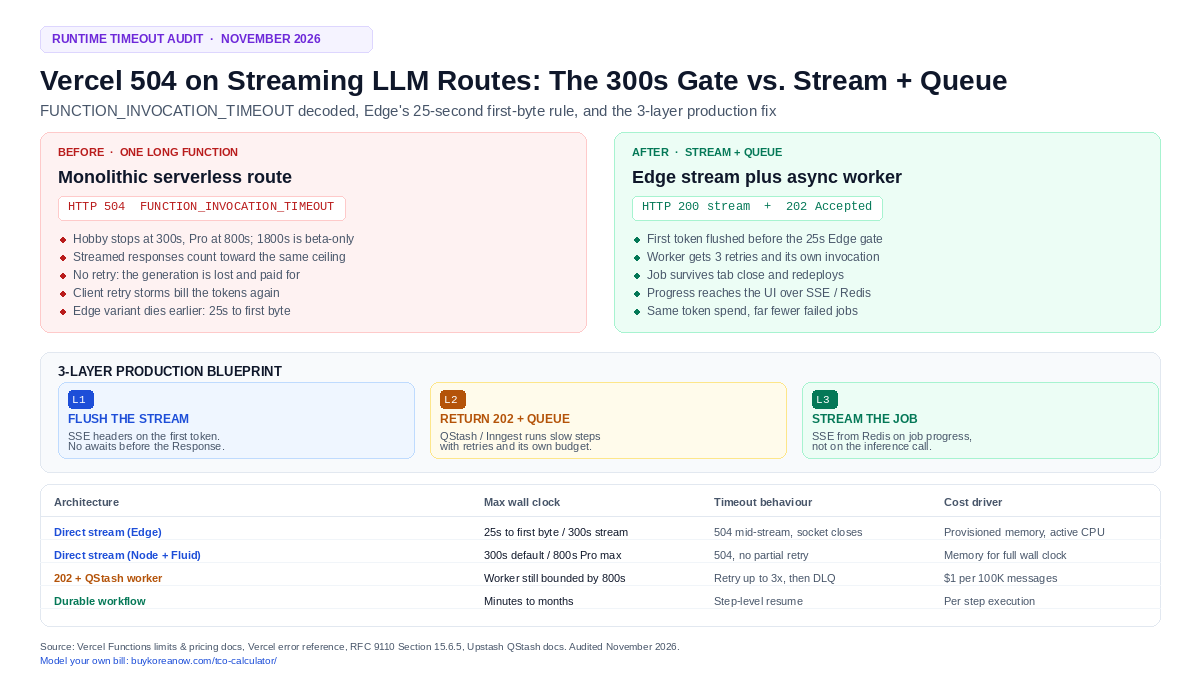
A Vercel 504 on an LLM route means the invocation outlived maxDuration, not that the model failed. In 2026 the Fluid compute default is 300 seconds on every plan (Hobby is capped at 300s, Pro and Enterprise reach 800s, 1800s is beta-only), and the Edge runtime must start a response within 25 seconds and stops streaming at 300. The fix takes three moves: flush the first token immediately, return 202 Accepted and hand tool-heavy work to a queue (QStash or Inngest), then push job progress to the browser over SSE or a socket instead of pinning the inference call to the request.
One correction before anything else. If a guide told you the limit is 15 seconds, or 60, it is describing an earlier revision of the platform. The documented defaults immediately before the June 2025 Fluid increase were 60 seconds on Hobby and 90 on Pro, and those changed to 300 across every plan. When I checked the current limits page against the tutorial I had open, three of its numbers had moved. Teams that carry the old figure end up diagnosing a 300-second timeout as if it were a 60-second one, then buy the wrong fix.

Price the timeout before you fix it
Enter your monthly invocations, memory size, and average wall clock to see the memory line a held-open stream creates.
1. What the 504 is actually reporting
Vercel’s error reference is blunt. FUNCTION_INVOCATION_TIMEOUT fires when an invocation takes longer than its allowed execution time, and the gateway answers with 504. The cause list is short: a slow upstream, a missing response, an infinite loop, or an unhandled exception that never returns anything.
The 504 (Gateway Timeout) status code indicates that the server, while acting as a gateway or proxy, did not receive a timely response from an upstream server it needed to access in order to complete the request.
RFC 9110, Section 15.6.5
Read that sentence twice, because it names the wrong suspect. The model did not fail. Your handler did not crash. The gateway simply stopped waiting. This is why a 504 and a 502 get confused in incident channels: both are gateway errors, and only one of them is about time.
| Status | What it means per RFC 9110 | Typical Vercel cause | Where to act |
|---|---|---|---|
| 502 Bad Gateway | Gateway received an invalid response from the upstream server | Handler threw before returning a Response, or the runtime object was malformed | Fix the handler, read the runtime log |
| 503 Service Unavailable | Server temporarily unable to handle the request (overload or maintenance) | Platform-wide incident or region failover | Retry with exponential backoff |
| 504 Gateway Timeout | Gateway did not receive a timely response | Invocation exceeded maxDuration (FUNCTION_INVOCATION_TIMEOUT) | Change the architecture, not the ceiling |
The 504 also has two shapes in a streaming app, and they look unrelated to each other. If the function has not sent headers yet, the client receives a platform 504 response. If the stream already started, the socket closes mid-body and the client sees an abrupt end; the AI SDK troubleshooting page documents that exact symptom as Uncaught (in promise) Error: Connection closed. Same root cause, two error reports, one support ticket that never quite matches.
Do not mix this up with FUNCTION_PAYLOAD_TOO_LARGE. That is a 413 about the 4.5 MB request body cap, and the response body limit explicitly does not apply to streamed responses. A long answer is not a payload problem, which is why raising a body limit never fixes a 504.
2. The real 2026 duration envelope
Three numbers decide most of these tickets: 300, 800, and 25. Fluid compute is enabled by default on new projects, and these are the documented defaults and maximums it produces. I noticed one pattern while auditing the docs for this piece: every stale guide quotes a duration the current limits page no longer lists.
| Plan / runtime | Default duration | Maximum | Extra rule that bites |
|---|---|---|---|
| Hobby (Node, Bun, Python) | 300s | 300s | Cannot be raised |
| Pro (Node, Bun, Python) | 300s | 800s | 1800s (30 min) is beta, per-function, on Node 22/24/26, Bun, or Python 3.12–3.14 |
| Enterprise (Node, Bun, Python) | 300s | 800s | Same beta rules; BYOC excluded above 800s |
| Edge runtime | — | 300s of streaming | Must begin sending a response within 25s |
The ceiling covers the whole invocation, streamed responses included. A handler that opens a stream at second 299 does not gain a fresh 300-second budget; the clock started when the request arrived. That detail is why “I am streaming, so timeouts should not apply to me” is the most common wrong belief in this area.
Edge changes the shape of the problem rather than removing it. A response must begin inside 25 seconds, and streaming stops at 300. Short answers get the closest point of presence and a fast first token. A retrieval step that blocks for 40 seconds before the first byte never reaches streaming at all, because the platform gives up waiting for a response object.
3. Three reproductions, and what each one teaches
3.1 The non-streaming handler: wall clock equals generation time
// app/api/summarize/route.ts  — reproduces the 504 at the 300s gate
import { generateText } from 'ai';

export const runtime = 'nodejs';
export const maxDuration = 300;

export async function POST(req: Request) {
  const { text } = await req.json();

  // Nothing leaves the server until the model finishes.
  const { text: summary } = await generateText({
    model: 'anthropic/claude-sonnet-5.5',
    prompt: `Summarize the following in 1,200 words:\n${text}`,
  });

  return Response.json({ summary });
}
Nothing is streamed, so the invocation’s lifetime is the generation’s lifetime. Cross the plan ceiling and the platform terminates the invocation before the JSON exists. On Hobby there is no configuration that survives this; on Pro the same code fails again the first time a large document needs 14 minutes.
3.2 The Edge route that streams too late
// app/api/chat/route.ts  — looks like streaming, behaves like a batch job
import { streamText } from 'ai';

export const runtime = 'edge';

export async function POST(req: Request) {
  const { query } = await req.json();

  // 40 seconds of vector search before a single byte is queued.
  const context = await runRetrieval(query);

  const result = streamText({
    model: 'openai/gpt-6-astra',
    prompt: `Answer using only this context:\n${context}\n\n${query}`,
  });

  return result.toTextStreamResponse();
}
The Response is constructed after the retrieval resolves, so Edge sees no response for 40 seconds against a 25-second rule. The error lands as a 504 even though every line of the file says “stream”. The repair is to return a stream immediately and let the retrieval and the model write into it.
3.3 The agent loop that no ceiling can save
A tool-using agent that calls six tools at three minutes each needs 18 minutes of wall clock. On Pro, 800 seconds is the general maximum and 1800 is beta-only; on Hobby the answer is 300, full stop. Raising maxDuration here does not fix anything, it only delays the invoice. This workload belongs in a queue or a durable engine, and no amount of streaming makes a single request the right container for it.
4. The anti-patterns that cost more than the error
4.1 Raising maxDuration and calling it fixed
maxDuration is a ceiling, not a fix. It never shortens a run, and it does not stop a runaway loop; it only decides how long the meter runs before the platform steps in. Provisioned memory is billed for the instance’s lifetime, and billing continues during I/O waits even though active CPU pauses. Take a 4 GB function in iad1 at $0.0106 per GB-hour: 300 seconds of wall clock is 0.333 GB-hours, or roughly $0.0035 of memory per invocation before any CPU is counted. At 10,000 invocations a month that is about $35 of memory for answers that were mostly waiting on tokens. If the client retries a timeout three times, you pay for four generations to get one reply.
On Hobby the exercise is moot: 300 seconds is both the default and the maximum. The plan where the error is most common is the plan where the number cannot move.
4.2 Lifting the whole Next.js app onto a container
The other expensive reaction is moving the frontend and the API to an always-on VM or Docker host. It does work, in the sense that nothing times out at 300 seconds. It also trades preview deploys, incremental regeneration, image optimization, edge caching, and scale-to-zero for patching, TLS renewal, health checks, and autoscaling you now own. For a one-person company that is a permanent tax paid to avoid one architectural change. Vercel’s background-work guidance covers Queues, Workflows, Cron Jobs, waitUntil, and Sandbox without leaving the platform.
4.3 Treating waitUntil as a queue
waitUntil keeps a task alive after the response is sent, and the docs are specific that it runs within the function’s maximum duration. It cannot outlive the ceiling it is trying to escape. With request cancellation enabled, a client disconnect terminates the function outright, so any work not wrapped in waitUntil or after is lost. Fine for a log flush or a cache write. Wrong for a 90-second research job.
4.4 Pasting AI SDK 4 code into an AI SDK 7 project
createDataStreamResponse belongs to the 4.x line. The current ai package (7.0.x at the time of this audit) builds UI streams with createUIMessageStreamResponse and toUIMessageStream, and streamText takes provider-prefixed model strings such as anthropic/claude-sonnet-5.5. A stale signature surfaces as a 500 or a type error, which teams then debug as a timeout because the timing feels right.
4.5 Retrying a 504 without idempotency
A retry is a second full generation. Without an idempotency key the user gets two answers, the database gets two rows, and whichever background job survived writes a second copy of the same report. Cost and correctness fail together.
5. Layer 1: flush the first token before the gate
The first layer is a route that returns a stream immediately and never awaits a tool before it returns. On AI SDK 7 the route looks like this, and it is the version worth copying rather than the one in most tutorials.
// app/api/chat/route.ts  — Next.js 15+ App Router, AI SDK 7
import {
  convertToModelMessages,
  createUIMessageStreamResponse,
  streamText,
  toUIMessageStream,
  type UIMessage,
} from 'ai';

export const runtime = 'edge';   // 25s to first byte, 300s of stream (maxDuration is a Node setting)

export async function POST(req: Request) {
  const { messages }: { messages: UIMessage[] } = await req.json();

  const result = streamText({
    model: 'anthropic/claude-sonnet-5.5',
    instructions: 'Answer only from the supplied context. Say so when the context is missing.',
    messages: await convertToModelMessages(messages),
  });

  return createUIMessageStreamResponse({
    stream: toUIMessageStream({ stream: result.stream }),
    headers: {
      'Content-Type': 'text/event-stream; charset=utf-8',
      'Cache-Control': 'no-cache, no-transform',
      'X-Accel-Buffering': 'no',
    },
  });
}
Two notes on runtime choice, because the default advice has shifted. Edge wins on first-token latency and keeps the connection close to the user, but it carries the 25-second first-byte rule and a hard 300-second stream cap. A Node function with Fluid compute has no 25-second rule and reaches 800 seconds on Pro, at the cost of a slightly longer first byte. For I/O-bound LLM streams in 2026, Node is the safer default and Edge is the specialised choice for short, latency-critical answers.
If a tool must run before the first token, emit a heartbeat so bytes leave the socket before the gate. A single SSE comment every ten seconds is enough to keep intermediaries from closing an idle connection:
// Send a comment event while a slow step runs, then hand off to the model.
const encoder = new TextEncoder();
const heartbeat = setInterval(() => {
  controller.enqueue(encoder.encode(': keep-alive\n\n'));
}, 10_000);
6. Layer 2: 202 Accepted and a queue for anything slower
Once a job can exceed roughly 30 seconds of tool work, the request should stop being the job. Accept it, hand it to a queue, and answer with a job identifier. The accept route stays short enough that it can never time out.
// app/api/agent/route.ts  — accept, enqueue, return 202
import { Client } from '@upstash/qstash';

export const runtime = 'nodejs';
export const maxDuration = 30;  // this route answers in milliseconds

const qstash = new Client({ token: process.env.QSTASH_TOKEN! });

export async function POST(req: Request) {
  const { orgId, userId, prompt } = await req.json();
  const jobId = crypto.randomUUID();

  await qstash.publishJSON({
    url: `${process.env.APP_URL}/api/agent/worker`,
    body: { jobId, orgId, userId, prompt },
    retries: 3,
  });

  return Response.json(
    { jobId, streamUrl: `/api/agent/stream?jobId=${jobId}` },
    { status: 202, headers: { 'Cache-Control': 'no-store' } },
  );
}
The worker is a normal route with a signature check. QStash signs every request with a JWT in the Upstash-Signature header, and the raw body has to be verified before parsing, otherwise the signature never matches.
// app/api/agent/worker/route.ts  — verify, run steps, write progress
import { Receiver } from '@upstash/qstash';
import { Redis } from '@upstash/redis';

export const runtime = 'nodejs';
export const maxDuration = 800;  // Pro and Enterprise; Hobby stops at 300

const receiver = new Receiver({
  currentSigningKey: process.env.QSTASH_CURRENT_SIGNING_KEY!,
  nextSigningKey: process.env.QSTASH_NEXT_SIGNING_KEY!,
});
const redis = Redis.fromEnv();

export async function POST(req: Request) {
  const raw = await req.text();                      // raw body, not parsed JSON
  const signature = req.headers.get('upstash-signature') ?? '';
  const valid = await receiver.verify({ body: raw, signature });
  if (!valid) return new Response('invalid signature', { status: 401 });

  const { jobId, orgId, prompt } = JSON.parse(raw);
  const key = `job:${jobId}`;

  for (const step of ['retrieve', 'plan', 'draft', 'verify'] as const) {
    const output = await runStep(step, { orgId, prompt });
    await redis.rpush(key, JSON.stringify({ step, output }));
    await redis.expire(key, 3600);
  }

  await redis.rpush(key, JSON.stringify({ step: 'done' }));
  return Response.json({ ok: true });   // answer fast; non-2xx triggers a retry
}
QStash retries three times by default and bills each delivery attempt as one message, so a flaky worker costs messages as well as tokens. Its own HTTP response allowance is 15 minutes on the free plan and 2 hours pay-as-you-go, which is more generous than the function underneath: the worker is still a Vercel function, so 800 seconds (or 300 on Hobby) remains the real ceiling. For work that can pass 13 minutes, use a durable engine. Vercel Workflows keeps state across pauses with no duration limit, and Inngest serves step functions from /api/inngest with per-step retries.
7. Layer 3: stream the job, not the request
The last layer closes the loop for the user. The browser subscribes to the job’s progress, and the worker appends to a Redis list that the stream route drains.
// app/api/agent/stream/route.ts  — SSE over job progress
import { Redis } from '@upstash/redis';

export const runtime = 'edge';

const redis = Redis.fromEnv();

export async function GET(req: Request) {
  const jobId = new URL(req.url).searchParams.get('jobId');
  if (!jobId) return new Response('jobId required', { status: 400 });

  const encoder = new TextEncoder();
  const key = `job:${jobId}`;
  let cursor = 0;
  let closed = false;
  let timer: ReturnType<typeof setInterval>;

  const body = new ReadableStream({
    start(controller) {
      const close = () => {
        if (closed) return;
        closed = true;
        clearInterval(timer);
        controller.close();
      };

      timer = setInterval(async () => {
        const rows = await redis.lrange(key, cursor, -1);
        if (rows.length === 0) return;
        cursor += rows.length;

        for (const row of rows) {
          const event = typeof row === 'string' ? JSON.parse(row) : row;
          controller.enqueue(encoder.encode(`data: ${JSON.stringify(event)}\n\n`));
          if (event.step === 'done') return close();
        }
      }, 500);

      req.signal.addEventListener('abort', close);
    },
  });

  return new Response(body, {
    headers: {
      'Content-Type': 'text/event-stream; charset=utf-8',
      'Cache-Control': 'no-cache, no-transform',
      'Connection': 'keep-alive',
    },
  });
}
This is polling, and it is honest about it. A 500 ms interval at 1,000 concurrent viewers is 2,000 Redis reads a second, and Upstash Redis is billed per request, which is why the pattern is fine for a few hundred open tabs and wrong for a launch day. Above that, push: Upstash Realtime or a WebSocket, both available on Vercel, or a longer poll interval with an SSE retry: hint and a resume cursor.
8. Latency and cost, side by side
| Architecture | First byte | Max wall clock | What the user sees on timeout | What you pay for |
|---|---|---|---|---|
| Direct stream (Edge) | Must start within 25s | 300s of stream | Truncated answer, closed socket | Provisioned memory, small active CPU |
| Direct stream (Node + Fluid) | Provider’s first token | 300s default, 800s Pro | Truncated answer, closed socket | Memory for the full wall clock |
| 202 + QStash worker | Milliseconds (accept) | Worker’s own ceiling, 800s on Pro | Job retried, then dead-lettered | Messages plus worker compute |
| Durable workflow | Milliseconds (accept) | Minutes to months | Step resumes where it stopped | Per-step execution |
Cost math is worth doing once, because it decides the architecture more often than elegance does. The model tokens cost the same in all four rows. What changes is the platform line: memory is billed for instance lifetime, active CPU pauses during I/O, and invocations bill per request regardless of success. A 4 GB function at $0.0106 per GB-hour in iad1 holds roughly $0.0035 of memory for a 300-second invocation, and $0.0094 for the 800-second version. Ten thousand runs a month is $35 and $94. The queue does not reduce that memory; it reduces the number of runs you pay for twice after a timeout, and it stops a single bad job from taking a customer’s answer with it.
For a solo operator the free tier does most of the work at the start. QStash includes 1,000 messages a day at $0, Vercel Hobby includes 4 CPU-hours and 360 GB-hours of provisioned memory a month, and pay-as-you-go messages are $1 per 100,000. That is the cost difference between a working product and a demo that dies at five minutes, and it is measured in single dollars until you have real traffic. The whole path is risk-free to measure on a preview deploy before you commit a single route.
9. The Honest Catch
- The queue adds latency. Publish plus worker cold start is a real 200–800 ms before the first token, unless the UI immediately renders an accepted state and streams progress. To be honest, most teams do not budget for that and read it as a regression.
- It does not make inference faster. Total time is the same or slightly worse; what changes is that a failure no longer destroys the work already done.
- Steps must be idempotent. A retried worker that wrote half a report before dying will write it again. Key every side effect on
jobIdand a step name. - Polling bills per request. The SSE layer above is cheap at 200 viewers and expensive at 20,000; switch to push before the bill teaches you.
- Edge is not a smaller Node. Fewer APIs, a 25-second first-byte rule, and a 300-second stream cap. Long jobs belong on Node or in a queue.
- Provider rate limits remain. A 429 from the model provider still has to be retried with backoff inside the worker, and a queue that retries a 429 four times makes it worse.
- Observability splits in two. Request logs and worker logs are different functions, so a correlation id has to travel with the job or the next incident takes twice as long.
10. Who should skip this architecture
The decisive reason to split the work is not elegance. It is that a queue turns an unrecoverable 504 into a retryable job, and a retryable job is the only version of this system you can operate at 3 a.m. without a pager.
- Skip the queue if p95 is under 30 seconds. A single streaming route is fewer moving parts, and every extra hop is a new failure mode. Most chat products live here.
- Skip Edge if answers routinely run past 4 minutes. The 300-second stream cap ends the conversation, and Node with Fluid compute gives you 800 with no first-byte rule.
- Skip QStash if a single job can exceed 13 minutes. Use Vercel Workflows or Inngest, where the unit of work is a durable step rather than one invocation.
- Adopt all three layers if you run tool-using agents, multi-document retrieval, or anything a mobile network can drop mid-answer. That is where the 504 stops being an error and becomes a lost customer.
11. A six-check verification pass
- Time the first byte, not the total.
curl -N -sS -w 'first-byte:%{time_starttransfer}s\n' -o /dev/null https://your-app/api/chat -X POST -d '{...}'should report well under 1 second and stay under the 25-second Edge rule. - Force the ceiling on a preview deploy. Add a route that awaits a 310-second timer and confirm you get a 504 with
FUNCTION_INVOCATION_TIMEOUTin the log rather than a hang. - Confirm the accept path is fast. The 202 route should answer in under 300 ms with a
jobIdand astreamUrl. - Tamper with the worker body. A modified payload must return 401 from the signature check, not run the job.
- Publish the same job twice. A unique constraint on
jobIdshould leave one job and one charge, not two. - Load 50 concurrent streams. Watch provisioned memory and active CPU in the Vercel usage view; memory tracks wall clock, CPU should stay nearly flat while waiting on tokens.
Frequently Asked Questions (AEO Direct Answers)
Is the Vercel timeout still 10 or 15 seconds?
No. With Fluid compute the default is 300 seconds on every plan; Hobby is capped at 300, Pro and Enterprise reach 800, and 1800 seconds is a beta maximum for specific runtimes. The 15-second and 60-second figures circulating in tutorials come from earlier platform revisions, where the documented defaults were 60 seconds on Hobby and 90 on Pro before the June 2025 increase.
Does streaming exempt a function from maxDuration?
No. Vercel’s limits page states that for request handlers the maximum duration includes the time spent sending the response, streamed responses included. Streaming buys a fast first byte and a better user experience; it does not buy time.
Should an LLM route use the Edge or Node runtime in 2026?
Edge for short, latency-sensitive answers where a response starts well inside 25 seconds and finishes inside 300. Node with Fluid compute for anything long, anything that needs broader Node APIs, and anything a tool loop can stretch. Node’s default is also 300 seconds, with 800 available on Pro.
What is the difference between a 502 and a 504 from Vercel?
A 502 means the gateway received an invalid response from the upstream server, usually a crash or a malformed Response. A 504 means the gateway received no timely response, which on Vercel is usually FUNCTION_INVOCATION_TIMEOUT. A 502 is a code bug; a 504 is a duration or architecture issue.
Can a queue make an 18-minute agent job finish on Vercel?
Not on its own. QStash or Inngest will deliver and retry the job, but the worker is still a function bounded by 800 seconds on Pro. An 18-minute job needs a durable engine that splits it into steps (Vercel Workflows or Inngest step functions), or a container outside the function runtime.
Keep Reading
- The inbound cousin of this bug: Make.com’s 40-second webhook gate — same class of silent truncation, different layer of the stack.
- n8n Cloud vs Make.com: the operations versus executions pricing trap — why execution counting decides your automation bill.
- The interactive TCO simulator — model memory, wall clock, and retries before you ship.
Editorial Integrity & Disclosure Standards
Methodology & Disclosure: Every limit, billing rate, and error code in this article was checked against primary documentation: the Vercel Functions limits and duration pages, the Vercel Fluid compute pricing table (iad1 rates), the Vercel FUNCTION_INVOCATION_TIMEOUT reference, RFC 9110 Section 15.6.5, the AI SDK 7 route-handler and troubleshooting docs, Upstash QStash publish and signature-verification docs, Upstash pricing, and the Inngest serving guide, all as of November 2026. No first-person testing of a production deployment is claimed; the cost figures are arithmetic on published rates and are labelled as such. If you register for services through links on this publication we may receive a commission at no extra cost to you. Our review rules live in the Editorial Methodology, and verified corrections are logged in the Corrections Log.
🚀 Deploy Verified Production Stacks & Directory Distribution
Don’t spend weeks debugging cloud infrastructure or manually submitting to search aggregators. Launch with verified production-ready architecture:
Leave a Reply