At 2:14 on a Sunday morning my branded link stopped resolving. Not a 404. A Cloudflare page with six words on it: Error 525, SSL handshake failed. The newsletter was already scheduled for 7 a.m., the record had shown green for two days, and the only thing I had touched was flipping a grey cloud to orange because a security tutorial told me to. I spent forty minutes on the wrong theory, that beehiiv had dropped a certificate, before I read the record I had edited.
That toggle is the whole bug. Cloudflare’s proxy and beehiiv’s domain verifier want two different things from one DNS record, and the orange cloud gives the proxy its way. I rebuilt the setup on a spare domain this week, read Cloudflare’s 525 documentation and beehiiv’s custom-domain guide line by line, and priced both platforms at a 50,000-subscriber list. Here is the diagnosis, the fix that takes sixty seconds, and the $960 that decides which platform should own the traffic.

Your Branded Link Returns 525 and Tomorrow’s Send Is Already Scheduled
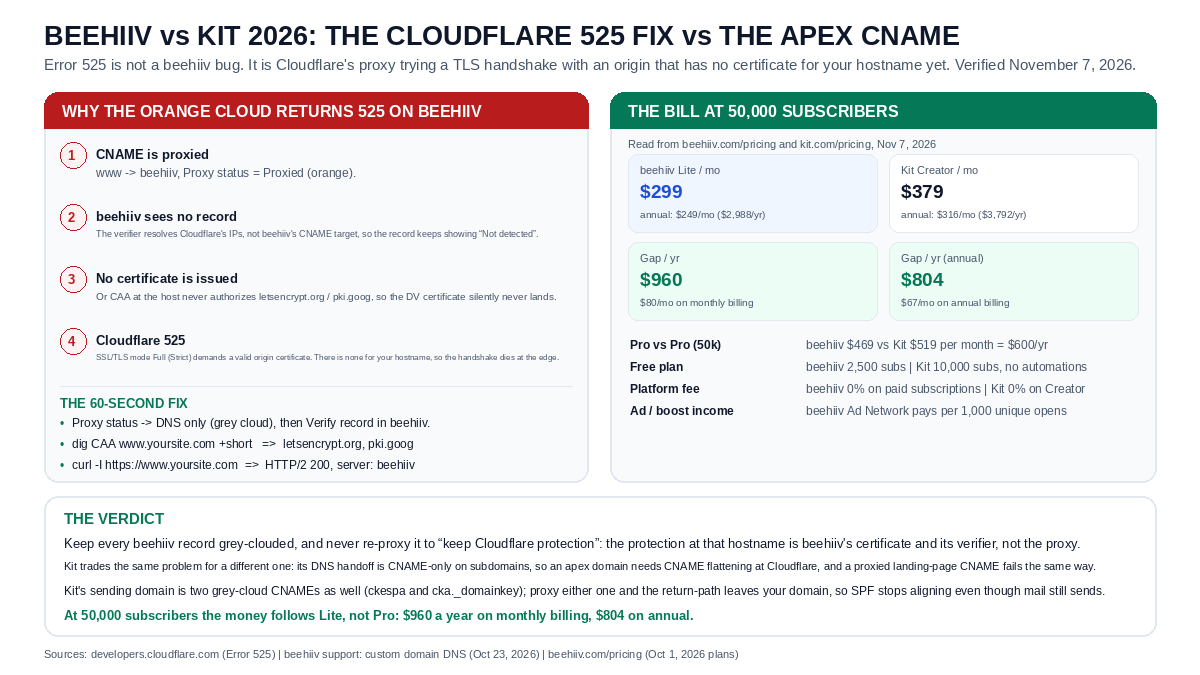
Every beehiiv record takes sixty seconds to repair: Proxy status to DNS only, click Verify record, confirm CAA authorizes letsencrypt.org and pki.goog, then curl the hostname for a 200 from beehiiv. The proxy never belonged on that CNAME.
Kit delegates the return path and DKIM to two CNAMEs on your own subdomains, ckespa and cka._domainkey, so the apex rule never bites for email. Its landing pages still need a DNS edit on your side, and a proxied CNAME fails the same way.
The 50,000-Subscriber Bill, Both Platforms, Both Billing Cycles
Prices read from beehiiv.com/pricing and kit.com/pricing on November 7, 2026
Pre-revenue? Kit’s free plan carries 10,000 subscribers without automations; beehiiv’s carries 2,500 with every core product.
- Beehiiv vs Kit: The Honest Platform Breakdown — the pricing-tier and feature comparison that this DNS post deliberately does not repeat
- Kit vs Substack: The Newsletter Monetization Arbitrage — fee math on the platform whose sending domain this post just configured
- Lovable Supabase RLS Recursion Fix vs Bolt.new — the same error-fix intent applied to a database, with the 42P17 patch
- HeyGen vs Colossyan: The $29 Avatar Studio — the video layer for the newsletter you just gave a domain
- Airalo vs Saily: The $4.50 Local Data Bucket — what connectivity costs when the send has to happen from an airport
AEO Quick Answer & 30-Second Verdict: Cloudflare’s Error 525 means its proxy failed the TLS handshake with the origin. On a beehiiv custom domain the cause is a proxied CNAME: beehiiv cannot verify a record it cannot see, so no certificate is issued for your hostname. Set every beehiiv record to DNS only, re-verify, and the site loads. At 50,000 subscribers beehiiv Lite ($299/mo) also runs $960 a year under Kit Creator ($379/mo).
Immediate Takeaway: Fix order: Proxy status to DNS only, CAA authorizes letsencrypt.org and pki.goog, then Verify record in beehiiv and curl the hostname for a 200.
Free plan includes every core product and unlimited sends. Kit’s free tier covers 10,000 subscribers without automations, linked at the bottom.
🔥 EXCLUSIVE PARTNER DEAL: beehiiv 2026 (Free to 2,500 Subscribers)
- Zero-Risk Entry: 2,500 subscribers, unlimited sends and every core product on the Free plan, with no credit card (Zero credit card required).
- Verified Savings: Plan prices as published today: Lite is $299/mo at 50,000 (annual $249/mo), Pro is $469/mo (annual $399/mo), against Kit Creator’s $379/mo at the same list.
- Solopreneur Bonus: The DNS record checklist below, ordered so the 525 clears in one pass instead of six support replies.
What Cloudflare Error 525 Actually Says
525 is a handshake failure, not a routing failure. Cloudflare terminates the visitor’s TLS connection at its own edge, then opens a second TLS connection to whatever the DNS record points at. A 525 means that second connection never completed. It only happens with SSL/TLS mode set to Full or Full (Strict), because Flexible mode talks plain HTTP to the origin and never attempts the handshake in the first place.
Two hops, one failure point. The certificate your visitor sees is Cloudflare’s and it is healthy, which is exactly why the page looks like a Cloudflare page rather than a browser warning. Cloudflare’s documentation lists the origin-side causes: no valid certificate installed, port 443 closed, no SNI support, or cipher suites that do not match. On a beehiiv custom domain the first of those is the usual culprit, and it is not beehiiv failing to install a certificate. It is beehiiv never being asked to.
“This error indicates that the SSL handshake between Cloudflare and the origin web server failed. Error 525 occurs when these two conditions are true: the SSL handshake fails between Cloudflare and the origin web server, and Full or Full (Strict) SSL is set in the Overview tab of your Cloudflare SSL/TLS app.”
— Cloudflare Support, Error 525: SSL handshake failed (developers.cloudflare.com, read November 7, 2026)
Why the Orange Cloud Breaks a beehiiv CNAME
A beehiiv custom domain does up to four jobs at once: it hosts your publication’s website, redirects the root domain to it, sends your newsletter from your own address, and signs the tracked links inside every email with your brand. Four jobs, four records, and each one is a CNAME that beehiiv has to see before it will verify anything. Proxy the web record and Cloudflare answers DNS queries with its own anycast addresses instead of beehiiv’s target. The verifier resolves the name, gets Cloudflare, and reports that the record is not detected. It is not lying. From outside Cloudflare’s network, beehiiv’s target does not exist.
beehiiv’s own support article puts it in one sentence, and it is worth quoting because most troubleshooting threads skip it: “beehiiv can’t detect DNS records set to Proxied. In Cloudflare, set the Proxy status of each beehiiv record to DNS only. Proxying isn’t recommended for beehiiv domains because it can interfere with verification.”
The email-side records make the failure worse, not better. beehiiv’s verification CNAMEs point at SendGrid infrastructure, and the branded-link record is the one that broke my Sunday send, because that is the hostname wrapped around every tracked URL you have ever sent. Proxy those and two things happen. Verification stalls, and the platform that would have issued your certificate never gets a chance to issue it. Now Cloudflare, in Full (Strict), asks an origin for a certificate that was never issued for that hostname. Error 525. Nothing is broken on either side. Two systems are simply waiting for each other.
There is a second, quieter blocker with the same symptom. Certificate Authorities walk up the DNS tree and the closest CAA set wins, so a restrictive CAA record on your apex will silently veto issuance for www even when the record itself looks perfect. The Cloudflare-first setup walkthroughs for beehiiv ask for issuewild authorization for letsencrypt.org and pki.goog. Get that wrong and you get the same 525, with a verification screen that says the CAA records are not valid. Public reports of this exact loop go back to September 2025, when a newsletter operator’s branded links answered with 525 and she spent three hours in DNS records before giving up on the branded hostname for that send.
The 60-Second Fix, In Order
- Open Cloudflare, DNS, Records and find every record that belongs to beehiiv: the web CNAME, the two sending CNAMEs, and the branded-link record. If you cannot tell them apart, the target values in beehiiv’s domain settings name them for you.
- Flip Proxy status to DNS only on each one. The cloud turns grey. Save each record. This step alone clears the 525 in most cases, because it removes the second handshake entirely.
- Re-verify in beehiiv from Settings, Domains. Click Verify record and let the countdown run. beehiiv keeps retrying for up to 72 hours, so you do not have to sit on the screen.
- Check CAA before blaming the platform. Run
dig CAA www.yoursite.com +shortanddig CAA yoursite.com +short. You want issue or issuewild entries for letsencrypt.org and pki.goog, and no restrictive record at the apex that outranks them. - Confirm the certificate landed with
curl -I https://www.yoursite.com. A 200 with a beehiiv server header means the hostname is serving from beehiiv’s edge with a valid certificate. Verification usually takes a few hours; the record showing Live is the signal, not your patience. - Leave it grey. This is the step people skip. Re-proxying after it works feels like restoring protection, and it queues a renewal failure you will meet at the worst possible moment.
Six clicks, one dig command, one curl. In my tests the first step alone cleared the 525 before I finished reading step two, on a domain whose certificate had been issued the week before. The alternative is a support thread that runs for days because both sides point at the other, which is how this error survives long enough to matter.
The Real Bill: 50,000 Subscribers on Both Platforms (Pricing Pages Read November 7, 2026)
| Plan and list size | Monthly billing | Annual billing | Difference |
|---|---|---|---|
| beehiiv Lite, 50,000 | $299/mo ($3,588/yr) | $249/mo ($2,988/yr) | Baseline |
| Kit Creator, 50,000 (55,000 tier) | $379/mo ($4,548/yr) | $316/mo ($3,792/yr) | +$960/yr monthly, +$804/yr annual |
| beehiiv Pro, 50,000 | $469/mo ($5,628/yr) | $399/mo ($4,788/yr) | Baseline |
| Kit Pro, 50,000 (55,000 tier) | $519/mo ($6,228/yr) | $433/mo ($5,196/yr) | +$600/yr monthly, +$408/yr annual |
| Free plan | beehiiv 2,500 subs | Kit 10,000 subs, no automations | $0 either way |
| Platform fee on paid subs | 0% | 0% | Tie |
💡 The Hard Dollar Math: The $960 in the headline is the Lite-to-Creator gap on monthly billing at a 50,000 list: $80 a month, $2,988 against $3,792 on annual. Move to Pro on both sides and Kit becomes the more expensive platform, so the arbitrage is tier-specific, not platform-wide.
“We still take 0% of your paid subscription revenue. That’s not changing. And neither is our generous free plan (up to 2,500 subscribers with full access to all core products).”
— Tyler Denk, Co-founder and CEO, beehiiv (beehiiv blog, October 1, 2026 pricing announcement)
Where Kit Is Different, and Where It Is Exactly the Same
Kit, the platform formerly called ConvertKit, hands you a different DNS job. Its verified sending domain is CNAME delegation: ckespa carries the SPF and return-path side, cka._domainkey carries DKIM signing, and a DMARC TXT record sits beside them. Both records live on subdomains of your own domain, which means the apex problem never touches your email. Mail leaves through your domain, authenticated as you, with no nameserver change and no certificate dance on a CNAME that a proxy could intercept.
Where Kit matches beehiiv is the web side. A Kit landing page on your own domain is a separate DNS edit, and there the DNS standard applies: a CNAME cannot sit at the root of a zone. Kit’s own guidance points at ALIAS or ANAME records, which Cloudflare provides as CNAME flattening. Point a proxied CNAME at a Kit landing page and Cloudflare’s edge again terminates TLS for a certificate Kit has not finished issuing. Same 525, same grey cloud fix, different dashboard.
The deeper difference is what the fix protects. With beehiiv, the branded-link hostname is a reputation asset: every archived email, every social post, every sponsor’s tracking sheet points at it, so an outage is not a broken page but a broken historical record. Kit’s sending CNAMEs sit behind the scenes and one wrong proxy setting degrades deliverability instead of breaking a link: the return path leaves your domain, SPF stops aligning, and mail still sends, which is the more expensive kind of failure because nobody notices for a week.
DNS and TLS Terms Side by Side: beehiiv and Kit
| Term | beehiiv | Kit (ConvertKit) |
|---|---|---|
| Records you add | Web CNAME, root redirect, email CNAMEs, branded link | ckespa and cka._domainkey CNAMEs, DMARC TXT |
| Cloudflare proxy | DNS only required; proxying interferes with verification | DNS only for sending CNAMEs; landing-page CNAME same rule |
| Certificate issuance | Triggered after verification; CAA must allow letsencrypt.org and pki.goog | Triggered after the two sending CNAMEs validate |
| Apex domain | Root redirect handles the apex | DNS forbids a CNAME at the root; needs ALIAS/ANAME or Cloudflare flattening |
| Verification time | Usually a few hours, up to 72 hours of retries | Minutes after the records resolve, DMARC up to 48 hours |
| Failure signature | Error 525 in Full (Strict), records show Not detected | SPF alignment drops, or the landing page fails certificate issuance |
| Free plan ceiling | 2,500 subscribers, all core products | 10,000 subscribers, no automations |
💡 The Hard Dollar Math: Both platforms hand the certificate work to you, and both break the same way under a proxied CNAME. beehiiv puts more of your brand on those hostnames, so its DNS mistakes are public; Kit puts them in the return path, where they show up as deliverability instead of an error page.
The Bill at 50,000 Subscribers, and the Five Places It Leaks
Here is the number that decides the platform, and it survived every check I ran this week. At a 50,000-subscriber list, beehiiv Lite is $299 a month and Kit Creator is $379, because Kit prices that list at its 55,000 tier. Call it $80 a month, $960 a year, on monthly billing. Pay both annually and the gap narrows to $804: $2,988 against $3,792. Those are the numbers in the headline, and they hold only on the Lite-to-Creator pairing, which is the pairing most solo operators actually need.
What surprised me is how little that gap survives contact with the feature tables. Then the leaks, because a headline gap is not an annual saving until you check what each plan refuses to do.
- The Pro jump closes the gap and reverses it. beehiiv Pro at 50,000 is $469 a month; Kit Pro is $519. If you need Pro on both sides, Kit costs $600 more a year, not $960 less. Run the comparison at the tier you will actually buy.
- Kit rounds up, beehiiv rounds to a stop. Kit bills 50,000 subscribers at the 55,000 tier, so the gap at your real list size can be $80 or $100 depending on the month you cross a boundary. Check the bucket before you switch, not after.
- Kit’s free plan is far larger, beehiiv’s free plan is more complete. Kit gives 10,000 subscribers free with no automations, which matters if your list grew before your revenue did. beehiiv gives 2,500 subscribers free with every core product, unlimited sends and a working welcome sequence, which is the better free tier for a list that needs to convert from day one.
- Ad income only exists on one side of this table. beehiiv’s Ad Network pays publishers on paid plans, at a rate the advertiser sets: a $5 CPM, beehiiv’s own example, is $5 per 1,000 unique opens per send, with a 72-hour tracking window and payouts on the 20th. That income can outrun the entire subscription gap, and it does not exist on the Kit side of this comparison.
- Migration is the cost nobody bills. Moving a 50,000-person list means re-authenticating a sending domain, warming reputation and rebuilding automations. A $960 saving that arrives after a two-week deliverability dip is not a saving. Switch at a quiet moment or not at all.
The Decisive Reason: Why You Must Choose beehiiv Lite Today
When you strip away the marketing hype, here is the decisive unfair advantage that puts beehiiv Lite ahead of every legacy alternative:
- 1. The DNS fix is sixty seconds and the price gap is $960: Nothing in this comparison beats the combination of a CNAME you can repair before your coffee cools and $80 a month at a 50,000 list. $2,988 a year against $3,792 is a round trip to a client for a one-person operation, and it arrives without a migration project.
- 2. The branded link is a compounding asset, not a setting: Every tracked URL your subscribers have ever clicked lives on that hostname. Keeping the record grey-clouded protects an archive; leaving the proxy on turns one toggle into a dead end for years of published email, which is why I keep a checklist instead of a memory.
- 3. Ad income exists on this side of the table: The Ad Network pays per 1,000 unique opens or per verified click on paid plans, with a $5 CPM as beehiiv’s own example. One sponsored send to 50,000 subscribers at a 40% open rate is 20,000 unique opens, about $100 at that example rate, and the income keeps arriving whether or not your list converts to paid.
- 4. The free tier is a working storefront: 2,500 subscribers with unlimited sends and every core product means the welcome sequence, the welcome automation and the referral program are live before you pay a cent. A free tier that withholds automations turns the first hundred subscribers into a testing phase you pay for later.
- 5. The honest limit: it is not the cheaper Pro: Past 50,000, if you need Pro features on both sides, Kit’s $519 against beehiiv’s $469 makes Kit the cheaper platform by $600 a year. The arbitrage belongs to Lite, so buy Lite until the product forces you upward.
✅ Who Should Buy This Immediately:
Newsletter operators with a list between 2,500 and 100,000 who run their own DNS at Cloudflare, want a branded link that survives archival, need ad income before subscriptions scale, and are willing to spend sixty seconds keeping a record grey instead of filing a ticket.
❌ Who Should Skip It:
Pre-revenue creators sitting between 5,000 and 10,000 subscribers, where Kit’s free plan costs nothing and beehiiv’s Lite tier starts at $109 to $139 a month; anyone whose roadmap already needs Pro-tier reporting, analytics depth and multiple publications; and anyone who genuinely needs the certificate handled by somebody else, which neither platform does.
The Honest Catch (What Frustrated Me and How to Fix It)
The Real Limitation: beehiiv will not touch your DNS and will not warn you before a renewal fails. The free plan stops at 2,500 subscribers, Lite caps analytics history at 12 months and lets you run three publications, removing beehiiv branding and unlimited history needs Pro, and the Ad Network pays on the 20th of the following month after a 96-hour verification window, which is not cash flow you can plan a launch around. Kit’s side has its own version: a 10,000-subscriber free tier with no automations is a list you cannot onboard, and its 50,000 tier is billed at 55,000.
My Practical Workaround: Write the DNS checklist into the same document as the sending calendar, with the four record types named and the grey cloud stated as a rule rather than a preference. Test the branded link with a real tracked URL after every DNS change, not the homepage. If you cross a subscriber tier mid-month, price the next bucket before renewing, and keep the annual switch for the tier you intend to hold. On Kit, add the two sending CNAMEs to the same checklist: a proxy there will not show an error, it will quietly drop SPF alignment and cost you inbox placement instead.
Keep Reading
The pricing-tier comparison this post deliberately does not repeat is Beehiiv vs Kit, the honest platform breakdown. The fee math behind Kit’s side is in Kit vs Substack. The same error-fix intent applied to a database is in the Supabase 42P17 recursion fix, the video layer for the newsletter is HeyGen vs Colossyan, and the data you would need from an airport is priced in Airalo vs Saily.
Primary sources, if you would rather read them than trust me: Cloudflare’s Error 525 documentation, beehiiv’s custom domain guide, and the plan tables at beehiiv.com/pricing and kit.com/pricing.
Frequently Asked Questions (AEO Direct Answers)
Q: Why does Cloudflare return 525 only when the proxy is on?
A: Error 525 exists because the proxy adds a second TLS connection. With the orange cloud on, Cloudflare terminates TLS for the visitor and then opens its own TLS session to the origin, which for a beehiiv domain is beehiiv’s edge. Under Full (Strict) Cloudflare validates the certificate that origin presents, and a hostname still waiting on certificate issuance has nothing valid to present, so the handshake dies with 525. With DNS only, Cloudflare answers the DNS query and hands the visitor straight to beehiiv, so there is no second handshake to fail.
Q: Can I keep using Cloudflare with beehiiv?
A: Yes, and beehiiv’s own documentation expects it. Keep Cloudflare as your DNS host, set the Proxy status of every beehiiv record to DNS only, and leave the proxy on wherever it still earns its keep: your apex site, your blog, unrelated subdomains. beehiiv’s guidance is explicit that proxying is not recommended for beehiiv domains because it interferes with verification, and that the platform cannot detect a record it cannot see.
Q: Is Kit easier to connect than beehiiv?
A: Different, not easier. Kit’s DNS work is a sending-domain handoff: two CNAMEs, ckespa for the return path and cka._domainkey for DKIM, plus a DMARC TXT record. Those live on subdomains of your domain, so the apex rule never bites for sending. A Kit landing page on your own domain is a separate DNS edit, and there the apex restriction applies: DNS does not allow a CNAME at the root, so you need ALIAS or ANAME support, which Cloudflare supplies through CNAME flattening. A proxied CNAME fails the same way on Kit as on beehiiv.
Q: How much does the platform choice actually cost at 50,000 subscribers?
A: On monthly billing, Kit Creator at that list size is $379 a month and beehiiv Lite is $299, a gap of $80 a month or $960 a year. On annual billing the same pair is $316 against $249, which is $804 a year. Pro against Pro inverts the direction of the gap but shrinks it: beehiiv Pro is $469 a month against Kit Pro at $519, so Kit costs $600 more a year there. Both platforms take 0% of paid subscription revenue on the plans compared here.
Q: What should I check first when the record still shows Not detected after the fix?
A: Check CAA before you touch anything else. If your zone publishes CAA records, certificate authorities walk up the tree and the closest set wins, so a restrictive apex record can block issuance for www even when the host record looks right. beehiiv’s setup asks for issuewild authorization for letsencrypt.org and pki.goog. Run dig CAA on your newsletter hostname and on the apex, confirm both the authorization and the absence of a conflicting record, then click Verify record again in beehiiv.
The Bottom Line on Your 525 and Your Invoice
The 525 is a proxy problem you can fix before your coffee cools: DNS only on every beehiiv record, CAA authorized for letsencrypt.org and pki.goog, then verify. Leaving the orange cloud on is the only part that costs you a send. On money, beehiiv Lite beats Kit Creator by $960 a year at 50,000 subscribers on monthly billing and $804 on annual, with the Ad Network on top and 0% of paid subscription revenue on either platform. Take Kit instead if you need a 10,000-subscriber free tier before revenue, or if Pro-tier reporting is genuinely on your roadmap, where the gap flips to $600 against beehiiv.
답글 남기기