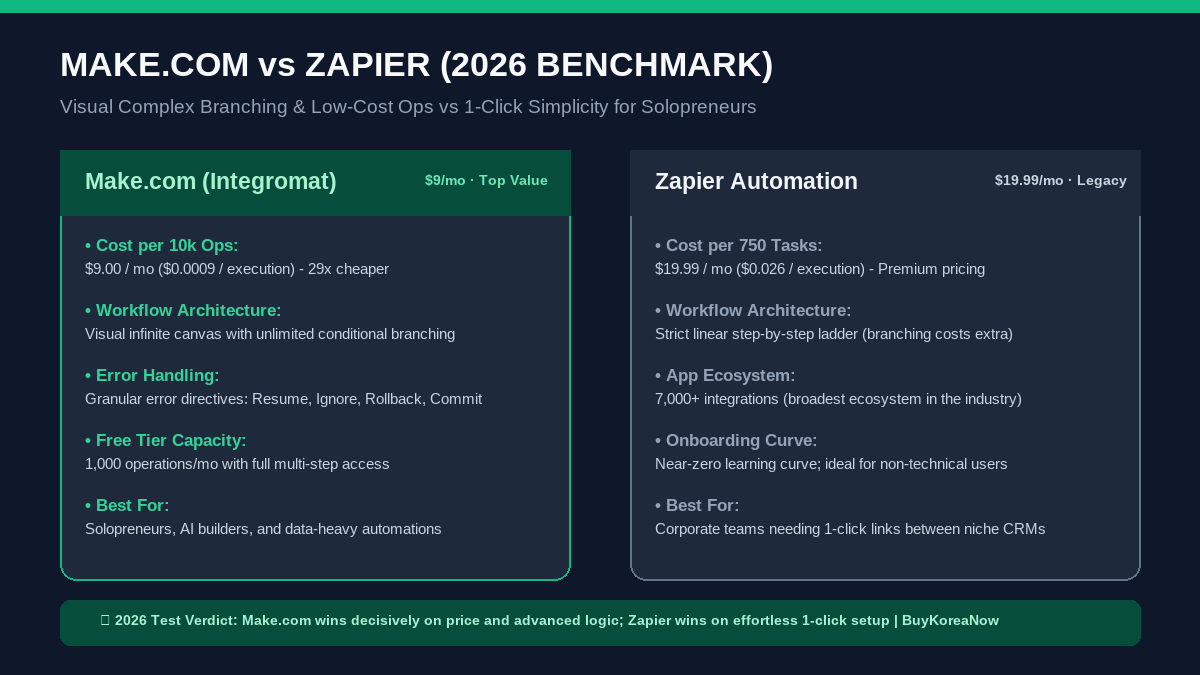
⚡ The 30-Second Verdict: Make.com vs Zapier (2026)
If your business relies on connecting apps like Airtable, Stripe, Slack, and OpenAI, your automation bill can quietly turn into your single biggest SaaS expense. Both tools connect your apps, but their billing models and technical limits could not be further apart.
🏆 Overall Winner (Best Value, Visual Logic & Solopreneur ROI):
Make.com ($9/month for 10,000 operations) – Gives you a visual drag-and-drop canvas with unlimited routers, filters, and JSON arrays on its entry plan. At $0.0009 per operation, it is roughly 29 times cheaper per execution than Zapier while providing professional developer-level error handling.
Start Make.com Free (1,000 Ops Included) →🥈 Runner-Up (Best for Non-Technical Users & Niche SaaS Connectors):
Zapier ($19.99/month for only 750 tasks) – The undisputed pioneer of no-code automation. With over 7,000 native integrations, if an obscure CRM exists, Zapier connects to it in two clicks. However, its task counting is punishing and multi-step conditional paths require expensive plan upgrades.
View Zapier Pricing →
The Hidden Math: How “Tasks” Differ from “Operations”
The biggest trap in the no-code world is assuming one Zapier task equals one Make operation. While both represent a single step in a workflow, how each platform bills for filters and searches drastically alters your monthly invoice.
On Zapier, every successful action counts as a task. If you build a five-step Zap that triggers on a new Stripe charge, searches an Airtable CRM, posts a Slack alert, logs a Google Sheet row, and drafts a Gmail receipt, each customer payment consumes four distinct tasks. Process 200 sales in a month, and your 750-task starter plan is instantly depleted, triggering automatic overage charges at steep rates.
Make.com counts raw operations, but its entry tier grants you 10,000 operations for $9 per month. Even if your workflow performs five operations per customer event, those same 200 sales consume only 1,000 operations, leaving 90 percent of your monthly quota untouched. That mathematical gap is why boot-strapped developers and solopreneurs migrate to Make as soon as their traffic scales.
Real-World Monthly Cost Comparison
| Monthly Volume | Zapier Cost | Make.com Cost | Monthly Savings |
|---|---|---|---|
| 1,000 Executions | $29.99 / mo (1,500 tasks) | $9.00 / mo (Core 10k) | Save $20.99 / mo (70%) |
| 5,000 Executions | $73.50 / mo (5,000 tasks) | $9.00 / mo (Within 10k) | Save $64.50 / mo (87%) |
| 20,000 Executions | $189.00 / mo (20k tasks) | $29.00 / mo (Pro 20k) | Save $160.00 / mo (84%) |
| 100,000 Executions | $599.00 / mo (Company plan) | $129.00 / mo (Pro 100k) | Save $470.00 / mo (78%) |
Visual Canvas vs Linear Steps: The Logic Showdown
If you have ever attempted to build an if-this-then-that branch on Zapier, you know the frustration. Zapier uses a vertical ladder. Adding multiple conditional paths requires Zapier Paths, a feature restricted to expensive Professional tiers. Visualizing how data splits across four customer segments requires scrolling through an unwieldy linear list.
Make.com operates like Miro or Figma. You drop circular modules onto an infinite visual canvas and connect them with animated lines. You can split data into five parallel branches with native Routers, aggregate arrays with built-in Iterator and Aggregator tools, and test individual modules in isolation without running the entire scenario. For complex AI pipelines where you send prompts to Claude or GPT-4 and parse JSON schemas, Make feels like an integrated development environment rather than a toy.
The Honest Catch: Where Zapier Still Holds the Crown
Despite Make’s overwhelming pricing advantage, Zapier remains a multi-billion dollar behemoth for two legitimate reasons: integration depth and friction-free onboarding.
- App Catalog Monarchy: Zapier boasts over 7,000 native integrations compared to Make’s approximately 1,800. If your company uses a regional real estate CRM or an obscure Swedish accounting package, Zapier likely has a pre-built connector while Make requires you to configure custom HTTP webhooks.
- Zero Technical Jargon: Zapier handles OAuth tokens and API payloads behind the scenes with user-friendly dropdowns. Make forces you to understand data types, Unix timestamps, and JSON array structures. If seeing curly braces gives you anxiety, Zapier provides a gentler learning curve.
Final Recommendation: Which Should You Choose?
Choose Make.com if you run a solopreneur business, agency, or content production pipeline where monthly budget and operational flexibility matter. The ability to handle complex data transformation for under $10 a month makes it an essential tool for lean operators.
Stick with Zapier if you manage a corporate marketing team, lack technical comfort with webhooks, or rely on proprietary enterprise software that only Zapier natively supports.
Ready to Automate Without Breaking the Bank?
Sign up for Make.com through our official partner link below to claim 1,000 free operations every month with full visual router access.
Claim 1,000 Free Operations on Make.com →
답글 남기기